AI Panel: Live Transcription and Images from a Discussion
Software that listens to a panel discussion, transcribes it as people speak, and turns what they say into images, summaries and speaking-time charts, all on one laptop.
- Active
- 2025–present
- Speech recognition
- Generative AI
- Local AI
- Events
In plain English
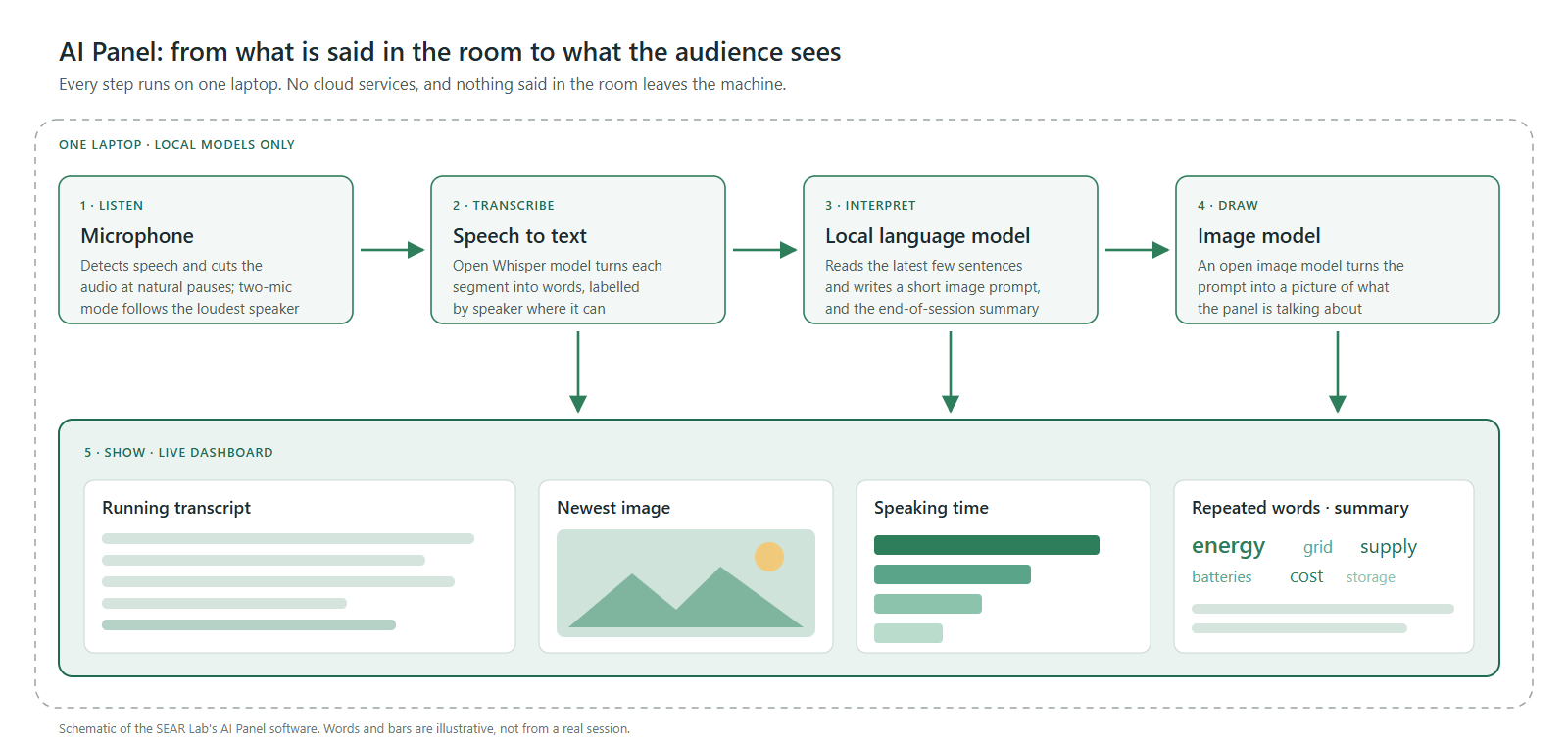
Panel discussions are hard to follow and harder to remember. This project asks whether a live discussion can be captured as it happens and turned into something an audience can see. Small cooperating programs do the work: one listens to the microphone and cuts the audio at pauses, one transcribes it with an open speech-recognition model, Whisper, and one asks a local language model to turn the latest sentences into a short image prompt, which an open image model then draws. A dashboard shows the running transcript, the newest image, who has spoken for how long, the most repeated words, and a summary at the end.
Everything runs on a single laptop with no cloud services, so nothing said in the room leaves the machine. Students rebuilt the pipeline several times, from a browser-and-cloud prototype in 2025 to a fully local version tuned for an ordinary laptop graphics card in 2026. One fix along the way, switching off the language model's step-by-step "thinking" mode, cut each image prompt from a minute or more to about 3 seconds. The newest version follows two microphones and switches to whoever is speaking loudest. Separating every speaker on a full panel is next.
Main points
- Transcribes speech in real time with an open Whisper model, cut at natural pauses.
- A local language model turns recent speech into image prompts, and an open image model draws them.
- The dashboard tracks speaking time, repeated words and an end-of-session summary, and exports a PDF.
- Runs entirely on one laptop: no cloud services, and no data leaves the room.
- Next: telling multiple speakers apart, and capturing a whole room.
People
- Erick C. Jones Jr., PhD, PEPrincipal Investigator · SEAR Lab directorin
- Varad NairStudent researcher (2025–26): server, team coordination and prompt design
- Venkata Sai Nikhil VuyyuruStudent researcher (2025–26): live audio streaming, Whisper and the local image pipeline
- Devaki Sudhakaran JeevanStudent researcher (2025–26): the first live interfacein
- Athira S PillaiStudent researcher (2025–26): audio testing and image validationin
- Sujeeth Sundarajan RajkumarStudent researcher (2025–26): testing, documentation and dashboard redesign
- Sunil PuvvalaStudent researcher (2025–26): language-model integration, session summaries and speaking time
- Sai Anwesh MamillapallyStudent researcher (2026): the laptop edition and two-microphone mode
- Karunakar KalvalaStudent researcher (2026): multi-speaker identification
Also contributed: Kankshita Siddhabathuni, Navya Manjunatha and Thejaswi Vepati (2025–26), and Dishant Koli and Harshada Santosh Padwal (an early image-generation precursor, 2023). Profiles marked in link to LinkedIn. More past and present lab members are on the SEAR Lab team page.