Statistics Basics and Linear Regression
Teaching · IE 3301 Engineering Probability
Sixty apartments in Austin, Texas: their monthly rent, their size, and a few other features. The questions are the ones a renter would ask. What does a typical apartment cost? How much more does each extra square foot cost? And how far can the answers be trusted?
The data are from Dr. Sager's course datasets at the University of Texas at Austin. To run this yourself, put the two data files from this page beside the notebook.
You also need pip install numpy pandas matplotlib scipy statsmodels. For the longer version of
this material in Python, see the free book
An Introduction to Statistical Learning, with Applications in Python.
You also need install.packages(c("car", "lmtest")); everything else is in base R. For the longer
version of this material in R, see the free book
An Introduction to Statistical Learning, with Applications in R.
Python
import numpy as np
import pandas as pd
import matplotlib.pyplot as plt
from scipy import stats
import statsmodels.formula.api as smf
from statsmodels.stats.outliers_influence import variance_inflation_factor
from statsmodels.stats.diagnostic import linear_reset, het_breuschpagan
R
suppressPackageStartupMessages({ library(car); library(lmtest) })
options(repr.plot.width = 6, repr.plot.height = 4.2, repr.plot.res = 100)
The data
Two files with the same 60 apartments. The first has only Rent (dollars per month) and Area
(square feet); the second adds seven more columns. Security, Parking and Shuttle are yes/no
flags (1 = yes). The original page gives no units for Distance or Age. The cell checks that
the two files agree on the columns they share.
Python
rents1 = pd.read_csv("AustinApartmentRents1.txt", sep=r"\s+")
df = pd.read_csv("AustinApartmentRents2.txt", sep=r"\s+")
print(rents1.shape, df.shape, "| same Rent and Area in both:", rents1.equals(df[["Rent", "Area"]]))
df.head()
(60, 2) (60, 9) | same Rent and Area in both: True
| Rent | Area | Bedrooms | Bathrooms | Security | Parking | Distance | Shuttle | Age | |
|---|---|---|---|---|---|---|---|---|---|
| 0 | 519 | 725 | 1 | 1 | 0 | 0 | 10.5 | 1 | 9 |
| 1 | 765 | 995 | 2 | 2 | 0 | 0 | 6.5 | 1 | 17 |
| 2 | 475 | 481 | 1 | 1 | 0 | 0 | 6.5 | 1 | 17 |
| 3 | 575 | 925 | 2 | 2 | 0 | 1 | 4.0 | 1 | 9 |
| 4 | 415 | 600 | 1 | 1 | 0 | 0 | 5.0 | 1 | 30 |
R
rents1 <- read.table("AustinApartmentRents1.txt", header = TRUE)
df <- read.table("AustinApartmentRents2.txt", header = TRUE)
cat(dim(rents1), "|", dim(df), "| same Rent and Area in both:", identical(rents1, df[, c("Rent", "Area")]), "\n")
head(df, 5)
60 2 | 60 9 | same Rent and Area in both: TRUE Rent Area Bedrooms Bathrooms Security Parking Distance Shuttle Age 1 519 725 1 1 0 0 10.5 1 9 2 765 995 2 2 0 0 6.5 1 17 3 475 481 1 1 0 0 6.5 1 17 4 575 925 2 2 0 1 4.0 1 9 5 415 600 1 1 0 0 5.0 1 30
Exploring the data
One row per column: its centre, its spread, its range, and its correlation with rent. Before you run it, guess which column moves most closely with rent.
Python
summary = df.describe().T[["mean", "std", "min", "50%", "max"]]
summary["corr with Rent"] = df.corr()["Rent"]
summary.round(2)| mean | std | min | 50% | max | corr with Rent | |
|---|---|---|---|---|---|---|
| Rent | 572.27 | 140.52 | 399.0 | 535.0 | 1050.0 | 1.00 |
| Area | 816.05 | 243.24 | 474.0 | 755.0 | 1864.0 | 0.87 |
| Bedrooms | 1.52 | 0.72 | 1.0 | 1.0 | 5.0 | 0.75 |
| Bathrooms | 1.25 | 0.44 | 1.0 | 1.0 | 2.0 | 0.77 |
| Security | 0.17 | 0.38 | 0.0 | 0.0 | 1.0 | 0.01 |
| Parking | 0.13 | 0.34 | 0.0 | 0.0 | 1.0 | 0.17 |
| Distance | 5.94 | 1.70 | 1.1 | 6.0 | 10.5 | -0.09 |
| Shuttle | 0.87 | 0.34 | 0.0 | 1.0 | 1.0 | 0.11 |
| Age | 16.33 | 7.92 | 1.0 | 16.5 | 32.0 | -0.05 |
R
summ <- data.frame(mean = sapply(df, mean), sd = sapply(df, sd), min = sapply(df, min),
                   median = sapply(df, median), max = sapply(df, max), corr_with_Rent = cor(df)[, "Rent"])
round(summ, 2)
mean sd min median max corr_with_Rent Rent 572.27 140.52 399.0 535.0 1050.0 1.00 Area 816.05 243.24 474.0 755.0 1864.0 0.87 Bedrooms 1.52 0.72 1.0 1.0 5.0 0.75 Bathrooms 1.25 0.44 1.0 1.0 2.0 0.77 Security 0.17 0.38 0.0 0.0 1.0 0.01 Parking 0.13 0.34 0.0 0.0 1.0 0.17 Distance 5.93 1.70 1.1 6.0 10.5 -0.09 Shuttle 0.87 0.34 0.0 1.0 1.0 0.11 Age 16.33 7.92 1.0 16.5 32.0 -0.05
A confidence interval for the mean rent
The sample mean estimates the mean rent of all apartments like these. A 95% confidence interval puts a margin around it that depends on the spread and the sample size :
Predict: with the mean and standard deviation in the table, roughly how wide is the interval?
Python
n = len(df)
xbar, s = df.Rent.mean(), df.Rent.std()
low, high = stats.t.interval(0.95, n - 1, loc=xbar, scale=s / np.sqrt(n))
print(f"n = {n}, mean = {xbar:.2f}, s = {s:.2f} (dollars per month)")
print(f"95% CI for the mean rent: {low:.2f} to {high:.2f}")
n = 60, mean = 572.27, s = 140.52 (dollars per month) 95% CI for the mean rent: 535.97 to 608.57
R
n <- nrow(df)
xbar <- mean(df$Rent); s <- sd(df$Rent)
ci <- xbar + c(-1, 1) * qt(0.975, n - 1) * s / sqrt(n)
cat(sprintf("n = %d, mean = %.2f, s = %.2f (dollars per month)\n", n, xbar, s))
cat(sprintf("95%% CI for the mean rent: %.2f to %.2f\n", ci[1], ci[2]))
n = 60, mean = 572.27, s = 140.52 (dollars per month) 95% CI for the mean rent: 535.97 to 608.57
A t test
Suppose someone claims the mean rent is $550. The one-sample test asks how far the sample mean sits from 550, measured in standard errors. Predict from the interval above, before you run it: will the p-value be above or below 0.05?
Python
test = stats.ttest_1samp(df.Rent, popmean=550)
print(f"t = {test.statistic:.3f}, p-value = {test.pvalue:.4f}")
t = 1.227, p-value = 0.2246
R
t.test(df$Rent, mu = 550)One Sample t-test data: df$Rent t = 1.2274, df = 59, p-value = 0.2246 alternative hypothesis: true mean is not equal to 550 95 percent confidence interval: 535.9653 608.5681 sample estimates: mean of x 572.2667
A regression line
Fit by least squares. The formula
Rent ~ Area reads the same way. Predict: how many dollars a month does one more square foot
add?
Python
simple = smf.ols("Rent ~ Area", data=df).fit()
ci = simple.conf_int()
print(f"R^2 = {simple.rsquared:.3f}")
pd.DataFrame({"coef": simple.params, "95% low": ci[0], "95% high": ci[1],
              "p-value": simple.pvalues.map("{:.2g}".format)}).round(3)
R^2 = 0.764
| coef | 95% low | 95% high | p-value | |
|---|---|---|---|---|
| Intercept | 160.187 | 97.412 | 222.963 | 3.8e-06 |
| Area | 0.505 | 0.431 | 0.579 | 7.8e-20 |
R
simple <- lm(Rent ~ Area, data = df)
cat(sprintf("R^2 = %.3f\n", summary(simple)$r.squared))
p <- summary(simple)$coefficients[, "Pr(>|t|)"]
cbind(round(cbind(coef = coef(simple), confint(simple)), 3), "p-value" = signif(p, 2))
R^2 = 0.764
coef 2.5 % 97.5 % p-value
(Intercept) 160.187 97.412 222.963 3.8e-06
Area 0.505 0.431 0.579 7.8e-20Confidence and prediction intervals
The line gives two kinds of interval at any area. A confidence interval is for the mean rent of all apartments of that size. A prediction interval is for the rent of one apartment of that size. Here they are for 500 and 1,000 square feet. Predict: which is wider, and by about how much?
Python
new = pd.DataFrame({"Area": [500, 1000]})
bands = simple.get_prediction(new).summary_frame(alpha=0.05)
bands.index = new.Area
bands[["mean", "mean_ci_lower", "mean_ci_upper", "obs_ci_lower", "obs_ci_upper"]].round(1)| mean | mean_ci_lower | mean_ci_upper | obs_ci_lower | obs_ci_upper | |
|---|---|---|---|---|---|
| Area | |||||
| 500 | 412.7 | 383.3 | 442.0 | 271.8 | 553.6 |
| 1000 | 665.2 | 642.8 | 687.5 | 525.5 | 804.8 |
R
new <- data.frame(Area = c(500, 1000))
conf <- predict(simple, new, interval = "confidence", level = 0.95)
pred <- predict(simple, new, interval = "prediction", level = 0.95)
round(data.frame(Area = new$Area, conf, pred_lwr = pred[, "lwr"], pred_upr = pred[, "upr"]), 1)
Area fit lwr upr pred_lwr pred_upr 1 500 412.7 383.3 442.0 271.8 553.6 2 1000 665.2 642.8 687.5 525.5 804.8
The same two intervals at every area, drawn around the line. The shaded band is the confidence interval; the dashed lines are the prediction interval.
Python
grid = pd.DataFrame({"Area": np.linspace(df.Area.min(), df.Area.max(), 100)})
g = simple.get_prediction(grid).summary_frame(alpha=0.05)
fig, ax = plt.subplots(figsize=(6, 4.2))
ax.scatter(df.Area, df.Rent, s=14, color="0.2", label="apartments")
ax.plot(grid.Area, g["mean"], label="fitted line")
ax.fill_between(grid.Area, g.mean_ci_lower, g.mean_ci_upper, alpha=0.3, label="95% confidence (mean rent)")
ax.plot(grid.Area, g.obs_ci_lower, "k--", linewidth=1, label="95% prediction (one apartment)")
ax.plot(grid.Area, g.obs_ci_upper, "k--", linewidth=1)
ax.set(xlabel="Area (square feet)", ylabel="Rent (dollars per month)")
ax.legend(fontsize=8, loc="upper left")
plt.show()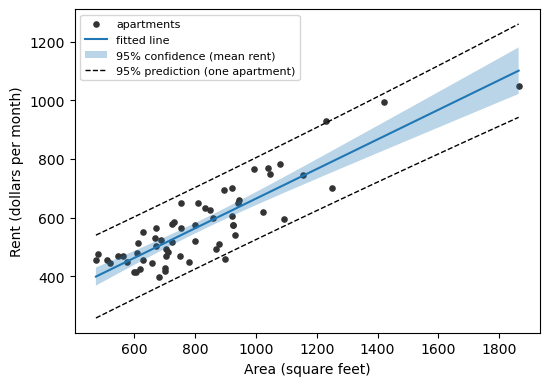
R
grid <- data.frame(Area = seq(min(df$Area), max(df$Area), length.out = 100))
conf <- predict(simple, grid, interval = "confidence")
pred <- predict(simple, grid, interval = "prediction")
par(mar = c(4, 4, 1, 1))
plot(df$Area, df$Rent, pch = 19, cex = 0.6, ylim = range(pred),
     xlab = "Area (square feet)", ylab = "Rent (dollars per month)")
polygon(c(grid$Area, rev(grid$Area)), c(conf[, "lwr"], rev(conf[, "upr"])),
        col = adjustcolor("steelblue", 0.3), border = NA)
lines(grid$Area, conf[, "fit"], col = "steelblue", lwd = 2)
matlines(grid$Area, pred[, c("lwr", "upr")], lty = 2, col = "black")
legend("topleft", c("apartments", "fitted line", "95% confidence (mean rent)", "95% prediction (one apartment)"),
       pch = c(19, NA, 15, NA), pt.cex = c(0.6, 1, 2, 1), lty = c(NA, 1, NA, 2), lwd = c(NA, 2, NA, 1),
       col = c("black", "steelblue", adjustcolor("steelblue", 0.3), "black"), cex = 0.8, y.intersp = 1.4, bty = "n")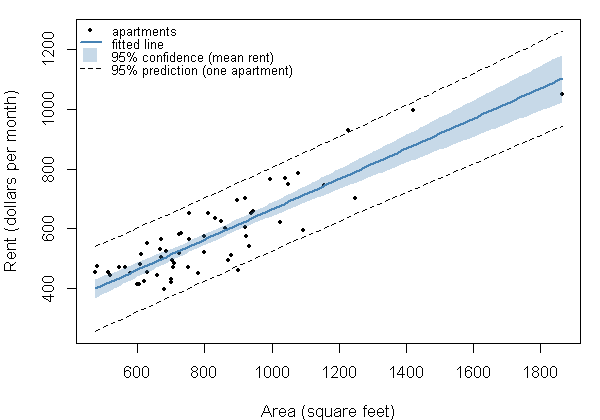
Multiple linear regression
Add the number of bathrooms: . Predict: once bathrooms are in the model, does the coefficient on Area go up,
go down, or stay where it was?
Python
fit2 = smf.ols("Rent ~ Area + Bathrooms", data=df).fit()
ci = fit2.conf_int()
print(f"R^2 = {fit2.rsquared:.3f}")
pd.DataFrame({"coef": fit2.params, "95% low": ci[0], "95% high": ci[1],
              "p-value": fit2.pvalues.map("{:.2g}".format)}).round(3)
R^2 = 0.801
| coef | 95% low | 95% high | p-value | |
|---|---|---|---|---|
| Intercept | 143.669 | 84.570 | 202.769 | 9.3e-06 |
| Area | 0.387 | 0.288 | 0.487 | 1.6e-10 |
| Bathrooms | 89.929 | 34.359 | 145.499 | 0.002 |
R
fit2 <- lm(Rent ~ Area + Bathrooms, data = df)
cat(sprintf("R^2 = %.3f\n", summary(fit2)$r.squared))
p <- summary(fit2)$coefficients[, "Pr(>|t|)"]
cbind(round(cbind(coef = coef(fit2), confint(fit2)), 3), "p-value" = signif(p, 2))
R^2 = 0.801
coef 2.5 % 97.5 % p-value
(Intercept) 143.669 84.570 202.769 9.3e-06
Area 0.387 0.288 0.487 1.6e-10
Bathrooms 89.929 34.359 145.499 2.0e-03Now five predictors: area, bathrooms, security, parking and distance. Predict: which of the five will have a p-value below 0.05?
Python
fit5 = smf.ols("Rent ~ Area + Bathrooms + Security + Parking + Distance", data=df).fit()
ci = fit5.conf_int()
print(f"R^2 = {fit5.rsquared:.3f}, adjusted R^2 = {fit5.rsquared_adj:.3f}")
pd.DataFrame({"coef": fit5.params, "95% low": ci[0], "95% high": ci[1],
              "p-value": fit5.pvalues.map("{:.2g}".format)}).round(3)
R^2 = 0.810, adjusted R^2 = 0.792
| coef | 95% low | 95% high | p-value | |
|---|---|---|---|---|
| Intercept | 167.450 | 80.993 | 253.908 | 0.00028 |
| Area | 0.396 | 0.295 | 0.498 | 2.1e-10 |
| Bathrooms | 92.600 | 36.428 | 148.773 | 0.0017 |
| Security | -0.679 | -45.645 | 44.287 | 0.98 |
| Parking | -38.265 | -90.184 | 13.654 | 0.15 |
| Distance | -4.929 | -15.054 | 5.196 | 0.33 |
R
fit5 <- lm(Rent ~ Area + Bathrooms + Security + Parking + Distance, data = df)
cat(sprintf("R^2 = %.3f, adjusted R^2 = %.3f\n", summary(fit5)$r.squared, summary(fit5)$adj.r.squared))
p <- summary(fit5)$coefficients[, "Pr(>|t|)"]
cbind(round(cbind(coef = coef(fit5), confint(fit5)), 3), "p-value" = signif(p, 2))
R^2 = 0.810, adjusted R^2 = 0.792
coef 2.5 % 97.5 % p-value
(Intercept) 167.450 80.993 253.908 2.8e-04
Area 0.396 0.295 0.498 2.1e-10
Bathrooms 92.600 36.428 148.773 1.7e-03
Security -0.679 -45.645 44.287 9.8e-01
Parking -38.265 -90.184 13.654 1.5e-01
Distance -4.929 -15.054 5.196 3.3e-01Multicollinearity
Multicollinearity means one predictor is (nearly) a combination of others, so the data cannot tell their effects apart. It is easiest to see on made-up data where you know the answer. Here , and are independent random numbers between 0 and 100, and is plus a tiny bit of noise. Python and R draw different random numbers, even from the same seed, so the numbers in the two versions from here to the next section will not match.
Python
rng = np.random.default_rng(1234)
sim = pd.DataFrame({"y": rng.uniform(0, 100, 50), "x1": rng.uniform(0, 100, 50),
                    "x2": rng.uniform(0, 100, 50)})
sim["z2"] = sim.x1 + sim.x2 + 0.005 * rng.uniform(0, 100, 50)
sim.corr().round(3)| y | x1 | x2 | z2 | |
|---|---|---|---|---|
| y | 1.000 | -0.299 | 0.040 | -0.164 |
| x1 | -0.299 | 1.000 | 0.267 | 0.797 |
| x2 | 0.040 | 0.267 | 1.000 | 0.795 |
| z2 | -0.164 | 0.797 | 0.795 | 1.000 |
R
set.seed(1234)
sim <- data.frame(y = runif(50, 0, 100), x1 = runif(50, 0, 100), x2 = runif(50, 0, 100))
sim$z2 <- sim$x1 + sim$x2 + 0.005 * runif(50, 0, 100)
round(cor(sim), 3)
y x1 x2 z2 y 1.000 0.078 -0.075 -0.001 x1 0.078 1.000 0.253 0.781 x2 -0.075 0.253 1.000 0.802 z2 -0.001 0.781 0.802 1.000
The variance inflation factor of predictor is , where comes from regressing predictor on all the other predictors. A VIF of 1 means no overlap; a common rule of thumb calls anything above 5 or 10 a problem. The loop fits three models: all of ; then without ; then without . It prints each model's VIFs and the standard error of the coefficient on . Predict: how large will the VIFs be in the first model?
Python
for formula in ["y ~ x1 + x2 + z2", "y ~ x1 + x2", "y ~ x1 + z2"]:
    fit = smf.ols(formula, data=sim).fit()
    X = fit.model.exog
    vifs = [f"{variance_inflation_factor(X, j):,.1f}" for j in range(1, X.shape[1])]
    print(f"{formula:17s} R^2 = {fit.rsquared:.3f}  SE of x1 = {fit.bse['x1']:7.3f}  VIFs = {', '.join(vifs)}")
y ~ x1 + x2 + z2 R^2 = 0.129 SE of x1 = 27.453 VIFs = 36,900.7, 36,518.3, 92,984.5 y ~ x1 + x2 R^2 = 0.105 SE of x1 = 0.149 VIFs = 1.1, 1.1 y ~ x1 + z2 R^2 = 0.105 SE of x1 = 0.237 VIFs = 2.7, 2.7
R
for (formula in c("y ~ x1 + x2 + z2", "y ~ x1 + x2", "y ~ x1 + z2")) {
  fit <- lm(as.formula(formula), data = sim)
  se <- coef(summary(fit))["x1", "Std. Error"]
  vifs <- prettyNum(round(vif(fit), 1), big.mark = ",")
  cat(sprintf("%-17s R^2 = %.3f  SE of x1 = %7.3f  VIFs = %s\n", formula, summary(fit)$r.squared, se,
              paste(vifs, collapse = ", ")))
}
y ~ x1 + x2 + z2 R^2 = 0.022 SE of x1 = 28.049 VIFs = 45,305.1, 49,446.2, 118,711.4 y ~ x1 + x2 R^2 = 0.016 SE of x1 = 0.135 VIFs = 1.1, 1.1 y ~ x1 + z2 R^2 = 0.016 SE of x1 = 0.210 VIFs = 2.6, 2.6
Checking the assumptions
The intervals and p-values above rest on assumptions about the errors : they are
roughly normal, the relationship is linear, and their spread is the same everywhere. The residuals
(actual minus fitted rent) stand in for the errors. The checks below use the two-predictor model,
Rent ~ Area + Bathrooms.
Normality of the residuals
A normal Q-Q plot puts each residual against where it would fall if the residuals were exactly normal. Normal residuals lie near the straight line. Predict: where on the plot would a few unusually expensive apartments show up?
Python
fig, ax = plt.subplots(figsize=(6, 4.2))
stats.probplot(fit2.resid, dist="norm", plot=ax)
ax.get_lines()[0].set(marker="o", markersize=4, color="0.2")
ax.set(title="", xlabel="Normal quantiles", ylabel="Residuals (dollars)")
plt.show()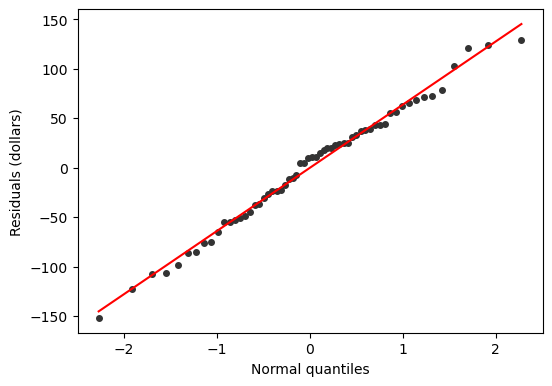
R
par(mar = c(4, 4, 1, 1))
qqnorm(resid(fit2), pch = 19, cex = 0.6, main = "", xlab = "Normal quantiles", ylab = "Residuals (dollars)")
qqline(resid(fit2))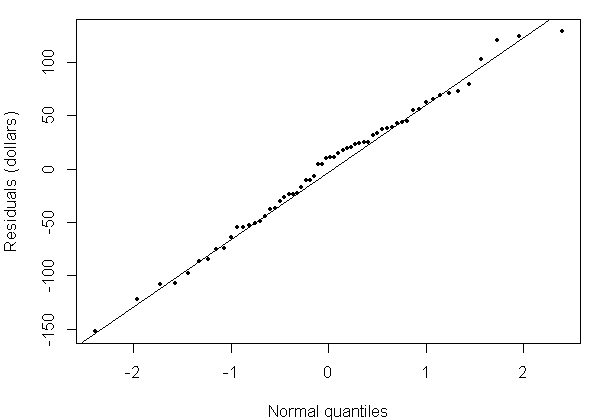
The Shapiro-Wilk test puts a number on the same question. Its null hypothesis is that the residuals come from a normal distribution, so a small p-value is evidence against normality.
Python
sw = stats.shapiro(fit2.resid)
print(f"Shapiro-Wilk W = {sw.statistic:.3f}, p-value = {sw.pvalue:.4f}")
Shapiro-Wilk W = 0.989, p-value = 0.8460
R
shapiro.test(resid(fit2))Shapiro-Wilk normality test data: resid(fit2) W = 0.98854, p-value = 0.846
Linearity and constant spread
Plot the residuals against the fitted rents. If the model is right, they form a band of even width around zero with no curve. Predict what a curve in this plot would mean, and what a funnel (narrow at one end, wide at the other) would mean.
Python
fig, ax = plt.subplots(figsize=(6, 4.2))
ax.scatter(fit2.fittedvalues, fit2.resid, s=14, color="0.2")
ax.axhline(0, color="0.5", linestyle="--", linewidth=1)
ax.set(xlabel="Fitted rent (dollars per month)", ylabel="Residual (dollars)")
plt.show()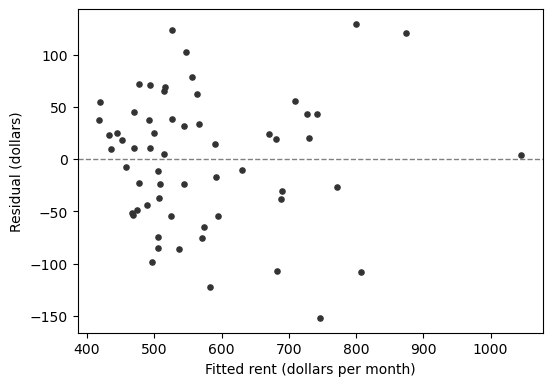
R
par(mar = c(4, 4, 1, 1))
plot(fitted(fit2), resid(fit2), pch = 19, cex = 0.6,
     xlab = "Fitted rent (dollars per month)", ylab = "Residual (dollars)")
abline(h = 0, lty = 2, col = "grey50")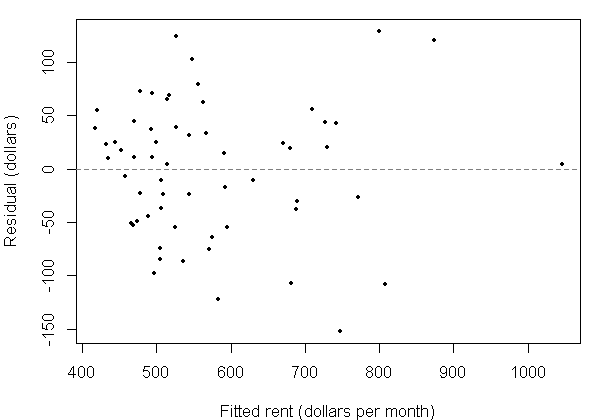
Ramsey's RESET test asks whether adding the squared and cubed fitted values improves the fit. Its null hypothesis is that they do not, that is, the linear form is enough.
Python
reset = linear_reset(fit2, power=3, test_type="fitted", use_f=True)
print(f"RESET F = {reset.statistic:.3f}, p-value = {reset.pvalue:.4f}")
RESET F = 1.136, p-value = 0.3285
R
resettest(fit2, power = 2:3, type = "fitted")RESET test data: fit2 RESET = 1.1361, df1 = 2, df2 = 55, p-value = 0.3285
Heteroscedasticity
Heteroscedasticity means the spread of the errors changes with the predictors. The Breusch-Pagan test regresses the squared residuals on the predictors; its null hypothesis is constant spread. The version here is Koenker's "studentized" one, the default in both Python and R, which does not lean on the errors being normal. Predict from the residual plot: will it reject?
Python
lm_stat, lm_p, f_stat, f_p = het_breuschpagan(fit2.resid, fit2.model.exog, robust=True)
print(f"Breusch-Pagan LM = {lm_stat:.3f}, p-value = {lm_p:.4f}")
Breusch-Pagan LM = 5.362, p-value = 0.0685
R
bptest(fit2, studentize = TRUE)studentized Breusch-Pagan test data: fit2 BP = 5.362, df = 2, p-value = 0.06849
Questions
- The $550 claim and the 95% confidence interval gave the same verdict. Will they always? What would change if the interval were 99%?
- In the five-predictor model,
Parkinghas a negative coefficient. Does parking lower rent, or could something else about those apartments explain the sign? - The three made-up models had similar . What, then, went wrong in the first one, and why does dropping either or fix it?